Testing HPIB on HP87 and HP82937A
Great things are planned for this page. But for now here is the bare bones of running the HP87 (and HP86) HPIB Service ROM.
The following assumes that you have an EBTKS and either an HP86A/B or HP87A/XM and at least one HP82937A HPIB Module.
Most of what is written here would also work with a PRM-87 with ROMs 340 and 341 enabled. See the PRM-87 documentation.
All the necessary files are available from links at the bottom of this page.
Configure your EBTKS to run the Service ROM and the HPIB Service ROM
Consider creating a separate SD card for this by making a copy of your current SD card. This is optional
Download either rom341 or HP87_ROMs.zip (and extract rom341).
Copy rom341 to the /roms87 directory on your SD card. You should already see rom340aux in this directory
Download CONFIG.TXT . Your web browser may try displaying this file because it is text. At least with FireFox, you have the option of opening the context menu with a right mouse button, and selecting
“Save Link As”.Replace CONFIG.TXT in the root directory of your SD card with the file just downloaded. This is why I suggested a separate SD card in step 1.
If you don’t already have a copy of the HP87 Service manual, downlaod a copy.
Read the manual cover to cover so that you are familiar with the contents. In particular, pages 2-11 onwards.With the Service ROMs installed, the computer will run an initial set of tests, then wait for a single character taht indicates what test to run next. If you don’t type somethin within 15 seconds the Service ROM will exit to the BASIC system. You can pause the 15 second timer with the ‘W’ character.
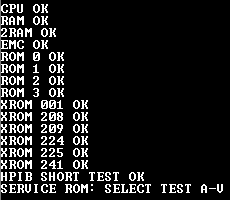
There are two HPIB tests, the Short Test and the Long Test. The Short test is started with ‘H’ and the Long test is started eith ‘I’. The Short test takes 488 ms (really) and the Long test takes a 2.5 seconds. If you allow the system to enter the BASIC environment, the tests are still available as follows:
HPIB 1 runs the Short test
HPIB 0 runs the Long test
You can write test programs that repeat these test by including the above keywords with either 0 or 1 as a parameter.
Test configuration 1:
HP87 as HPIB Controller, 82937A as Device
Turn the computer off while plugging and unplugging modules, cables, and changing switch settings.
HP87 as a Controller, Device 21, Select code 7:
Set your HP 87 HPIB dip switches as shown in the picture that matches this description
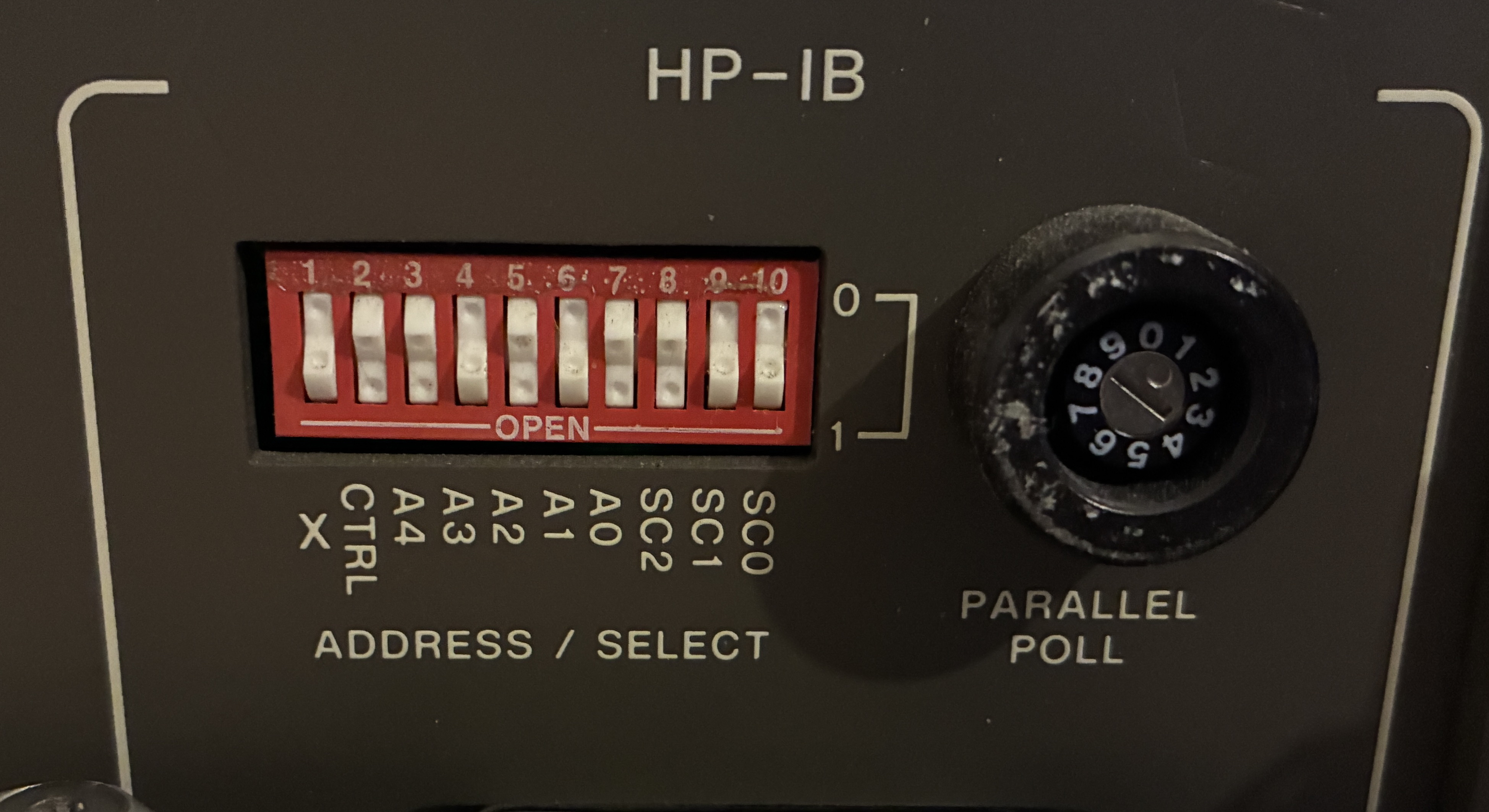
HP87 as Controller, Device 21, Select code 7
Set your HP82937A as a Device, Device code 20 Select code 6
Set your HP82937A dip switches as shown in the picture that matches this description
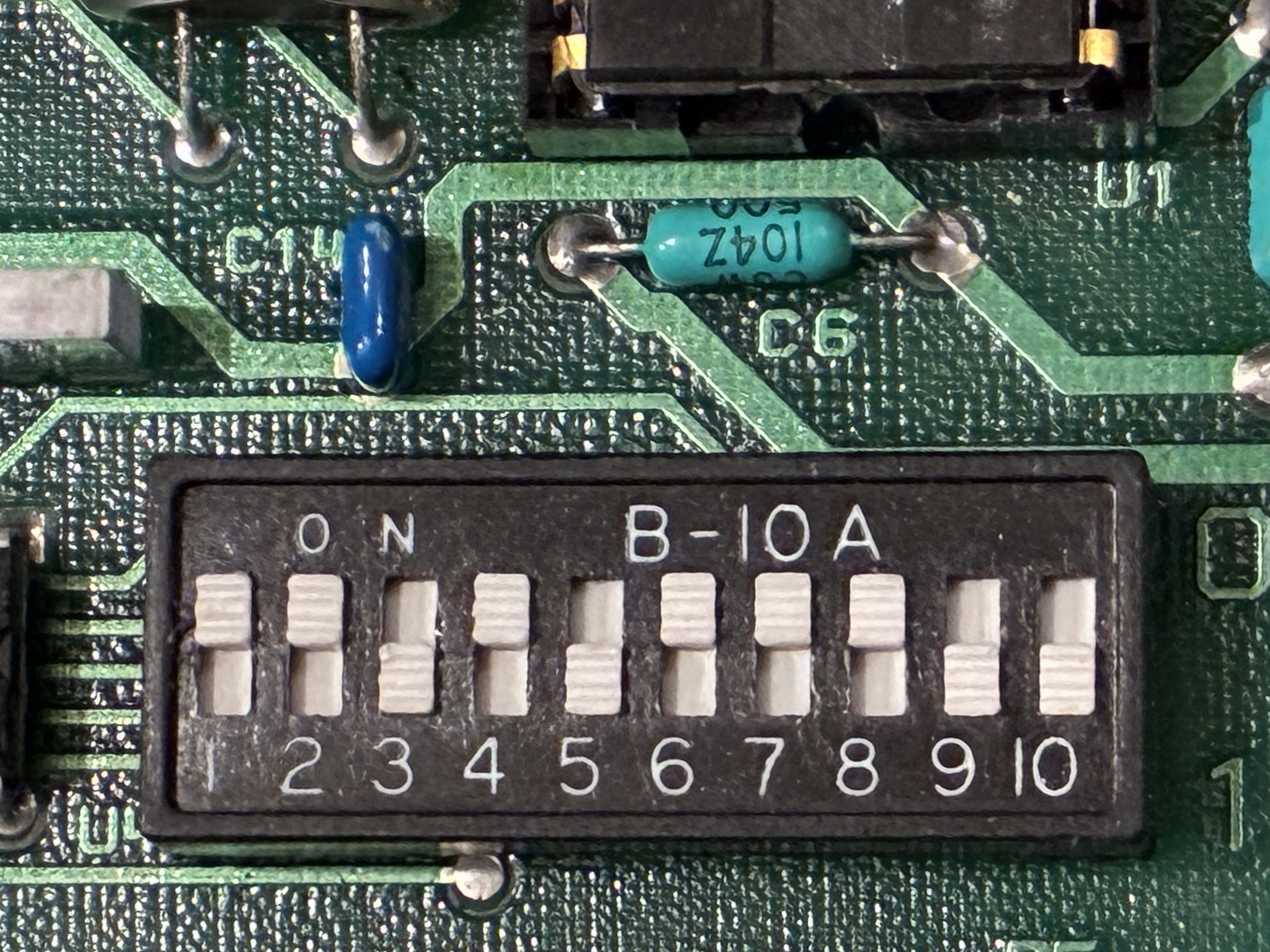
82937A as Device, dev 20, Select code 6
Connect the HPIB cable from the HP82937A to the HPIB connector on the back of the HP87
Turn on the computer, and when you get to the prompt for a command letter, type commands H and I.
If you get any error codes, the Service manual discusses this starting at page 2-81.
Note that figure 2-17 on this page is junk. Use the images on this page.
An example BASIC HPIB Test Program
Program name:  HPIBTEST1.BAS

10 A=0
20 HPIB 0
30 DISP A
40 A=A+1
50 IF A MOD 2=0 THEN 100
60 SETLED 1,40,0,0 @ SETLED 2,0,0,40
70 GOTO 20
100 SETLED 1,0,0,40 @ SETLED 2,40,0,0
110 GOTO 20
9999 END
There is a download link for this program at the bottom of this page. After downloading the program, copy it to the /BAS directory on the SD card.
Start the computer, and enter the following commands:
SCRATCH
SDGET /BAS/HPIBTEST1.BAS
STORE "HPIBTEST1"
RUN
Test configuration 2:
HP87 as Device, 82937A as HPIB Controller
Turn the computer off while plugging and unplugging modules, cables, and changing switch settings.
HP87 as a Device, Device 20, Select code 6:
Set your HP 87 HPIB dip switches as shown in the picture that matches this description
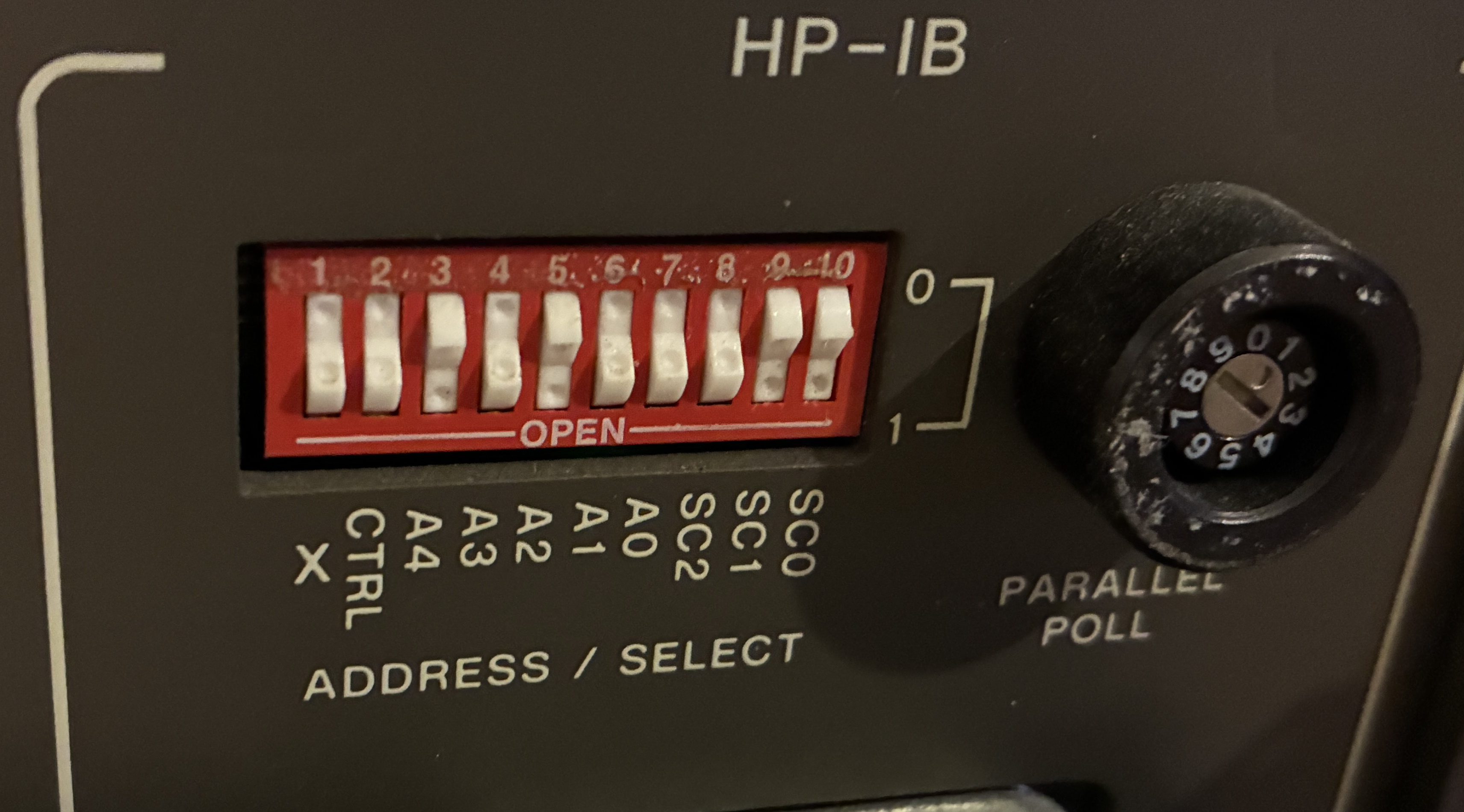
HP87 as a Device, Device 20, Select code 6
Set your HP82937A as a Controller, Device code 21 Select code 7
Set your HP82937A dip switches as shown in the picture that matches this description

82937A as a Controller, Device 21, Select code 7
Connect the HPIB cable from the HP82937A to the HPIB connector on the back of the HP87
Turn on the computer, and when you get to the prompt for a command letter, type commands H and I.
If you get any error codes, the Service manual discusses this starting at page 2-81.
Note that figure 2-17 on this page is junk. Use the images on this page.
All the ROMs for HP86A/B and HP87A/XM
The table is sorted by ROM number, ascending.
AssemblerHP and AssemblerEK are alternatives. AssemblerEK is patched by Everett
and probably fixes some bugs.
If you want the Matrix Keywords, both ROMs must be enabled
If you want the Advanced Programming Keywords, both ROMs must be enabled
Description |
File Name |
Decimal |
Octal |
|
|---|---|---|---|---|
System Swap |
0 |
000 |
Built-in |
|
Graphics |
1 |
001 |
Built-in |
|
MIKSAM |
rom016 |
14 |
016 |
|
Language |
rom030 |
24 |
030 |
|
EK ExtROM |
rom047 |
39 |
047 |
|
AssemblerEK |
rom050.HP |
40 |
050 |
Patches by Everett |
AssemblerHP |
rom050.EK |
40 |
050 |
|
SYSEXT |
rom070 |
56 |
070 |
|
FORTH |
rom250 |
168 |
250 |
|
Matrix 1 |
rom260 |
176 |
260 |
|
Matrix 2 |
rom261 |
177 |
261 |
|
I/O |
rom300 |
192 |
300 |
|
EMS |
rom317 |
207 |
317 |
|
Mass Storage |
208 |
320 |
Built-in |
|
EDISK |
rom321 |
209 |
321 |
|
HP-87 Service-87 |
rom340 |
224 |
340 |
|
HP-87 Service-87AUX |
rom340aux |
224 |
340 |
AUXROM Aware |
HP-87 HP-IB Service |
rom341 |
225 |
341 |
|
Advanced Prog 2 |
rom347 |
231 |
347 |
|
Advanced Prog 1 |
rom350 |
232 |
350 |
|
Plotter |
rom360 |
240 |
360 |
|
AUXROM 1 |
rom361 |
241 |
361 |
Required for EBTKS |
AUXROM 2 |
rom362 |
242 |
362 |
Required for EBTKS |
AUXROM 3 |
rom363 |
243 |
363 |
Required for EBTKS |
AUXROM 4 |
rom364 |
244 |
364 |
Required for EBTKS |
Downloads for this page
HP87_Service_Manual_00087-90016_196_pages_1982_March.pdf
82937A_HP-IB_Interface_Installation_And_Theory_Of_Operation_Manual_82937-90007_57_pages_1980_October.pdf
82937A_HP-IB_Interface_Service_Manual_82937-90013_41_pages_1980_June.pdf
HP-IB_Interface_Series80_Owners_Manual_82937-90017_93_pages_1982_January.pdf
HP87_ROMs.zip
rom341
CONFIG.TXT (right click on the link and select "Save Link As" (or equiv))
HPIBTEST1.BAS (right click on the link and select "Save Link As" (or equiv))